
The Call That Got Away
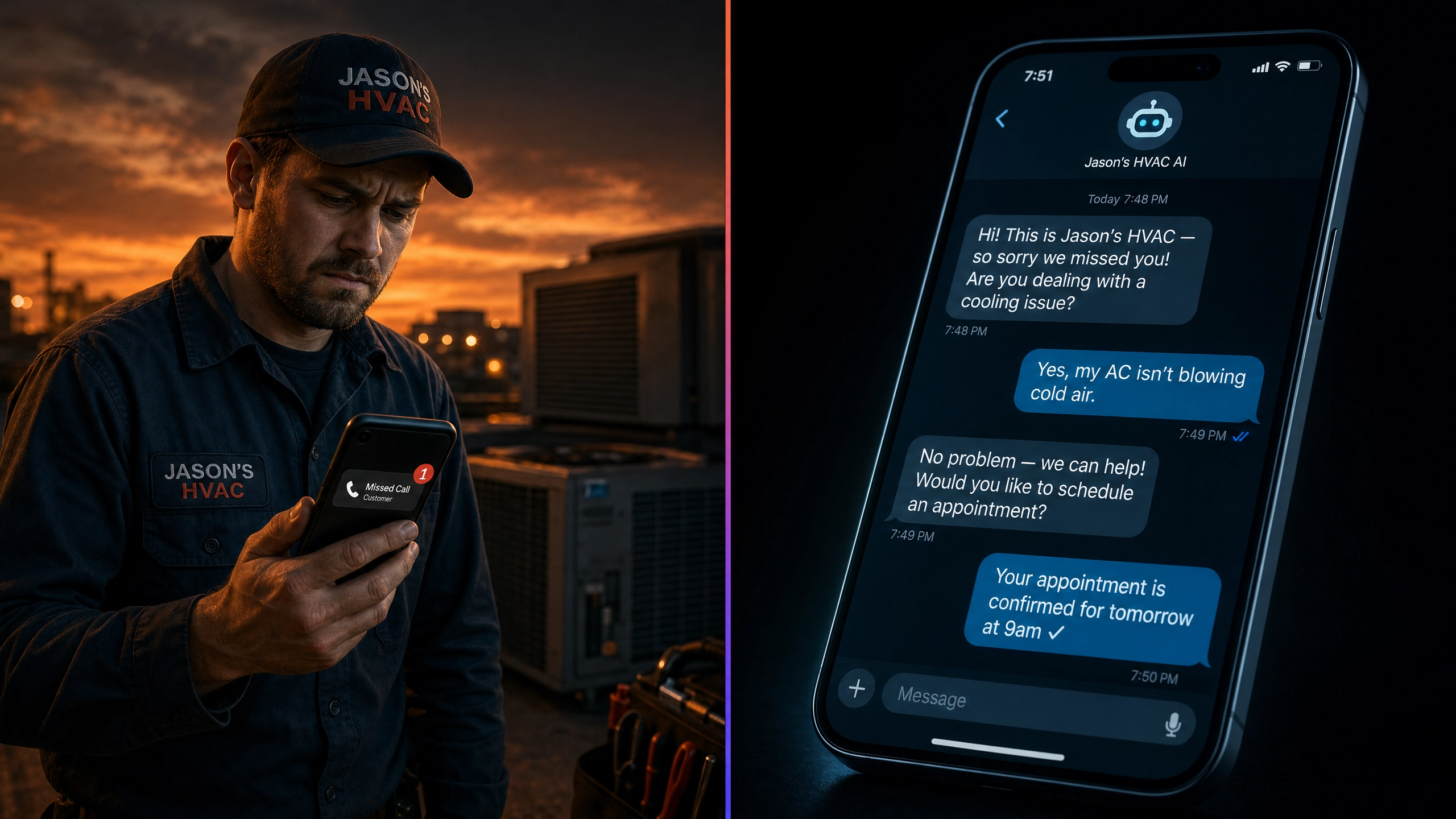
It's 10:17pm on a Thursday. A homeowner's air conditioner has stopped working. It's 84 degrees inside and climbing. She grabs her phone, finds three HVAC companies in Google, and starts calling.
The first company: voicemail. She leaves a message and keeps scrolling.
The second company: voicemail. She doesn't leave one this time.
The third company: within four seconds of hanging up, her phone buzzes with a text — "Hey, this is Jason's HVAC! So sorry we missed you — are you dealing with a cooling issue? I'd love to get you taken care of." She replies. Within two minutes, she has a confirmed appointment for 7am the next day.
The first two businesses didn't lose that job because they weren't good. They lost it because they weren't there. The third business was — even though every technician was off the clock.
That third business was running an AI receptionist. And in 2026, it's becoming the single biggest competitive advantage in home services — not because it's impressive technology, but because the businesses without it are quietly losing jobs to the ones who have it.
This article breaks down exactly what an AI receptionist is, how it works, what it costs, and how to know if your service business actually needs one.
What Is an AI Receptionist, Exactly?
Let's get one thing clear upfront: an AI receptionist is not a robot voice that answers calls and says "press 1 for billing." That's a phone tree. This is something fundamentally different.
An AI receptionist is an automated intake system that handles inbound contact across multiple channels — SMS text, web chat, social media DMs, and phone — using natural language AI to have real conversations with your prospective customers. It can:
- Respond to a missed call within seconds via text message
- Ask qualifying questions to understand what the customer needs
- Answer common FAQs about your services, pricing ranges, and service areas
- Check your live calendar and book an appointment directly
- Send confirmation and reminder messages automatically
- Escalate to a human when a conversation needs a personal touch
The key distinction: it sounds human, and it responds instantly. Customers frequently don't realize they're talking to an AI — they experience it as a business that's incredibly responsive and attentive. That perception is worth more than most owners realize.
"I've been in digital marketing for over 20 years. I've watched businesses spend hundreds of thousands on ads to generate leads — and then lose 60% of those leads because no one responded in time. An AI receptionist is the fix to the problem most owners don't even know they have."
— Krystle Cason, Founder, Flowhaus DigitalAt Flowhaus, we build AI receptionist systems on FlowAI, which is powered by GoHighLevel's 2026 AI stack — including Conversation AI and Voice AI. These tools have matured significantly in the past 12 months and are now production-ready for real service businesses.
How an AI Receptionist Works — Step by Step
The best way to understand this is to walk through a real scenario. Let's say you run a pest control company. It's a Saturday evening. A homeowner finds ants in her kitchen and searches for pest control.
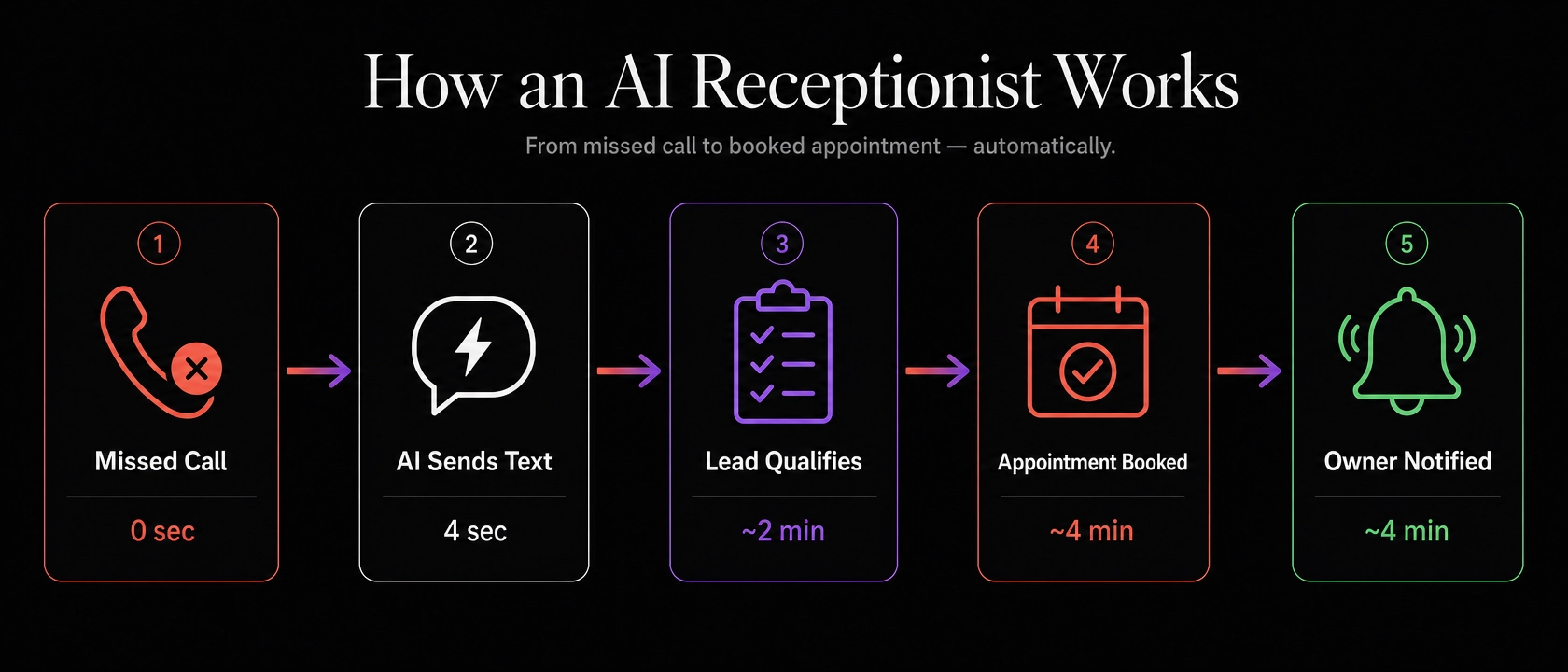
Missed call triggers the AI — in seconds, not minutes
Your phone rings at 7:43pm Saturday. You're finishing a job site or putting the kids to bed. The call goes to voicemail. Within 3–5 seconds of the caller hanging up, your AI receptionist sends a text: "Hi there! This is Coastal Pest — so sorry we missed your call! Are you dealing with a pest issue? We'd love to help get it handled."
The AI has a real conversation to qualify the lead
The customer replies: "Yes, I have ants everywhere in my kitchen." The AI responds naturally, asks follow-up questions — How many rooms affected? Any previous treatments? What's your address to confirm we service your area? — and gathers everything your team needs to prepare for the job. The conversation sounds human. It's not scripted in a robotic way; it adapts to what the customer says.
Appointment booked directly to your calendar
Once the lead is qualified, the AI checks your live availability and offers slots: "We have Monday morning at 9am or Monday afternoon at 2pm — which works better for you?" The customer picks a time. The appointment is booked. Both sides get a confirmation text. Your calendar updates automatically. No human involvement required.
You wake up to booked jobs, not missed calls
Sunday morning, you check your phone. There's a notification: three new appointments booked overnight. One HVAC inspection, one pest control treatment, one plumbing estimate. All qualified. All confirmed. Your competitors? Three missed calls and full voicemail boxes.
Automated reminders reduce no-shows
24 hours before the appointment, the AI sends a reminder. The day of, it sends another with your technician's name and ETA. If the customer needs to reschedule, they can do it by replying to the text — and the AI handles the rescheduling automatically. Your front desk workload is cut in half before you even open the door.
Is This Going to Replace My Customer Service Team?
This is the first thing most owners ask — and the honest answer is: no, and that's not what it's designed to do.
Here's the reality of what a CSR can and can't do. Your best customer service person is exceptional at handling complex conversations, managing upset customers, building rapport with regulars, and upselling service packages. They're not exceptional at being available at 11pm, answering three calls simultaneously, or following up 47 minutes after someone fills out a web form on a Tuesday afternoon.
The AI receptionist handles the gap: the after-hours intake, the overflow calls, the instant follow-up that no human team can deliver consistently. It's not a replacement. It's the shift that never ends.
In our experience building these systems for HVAC, pest control, and plumbing companies, the pattern is consistent: when businesses add AI intake, their team's workload doesn't shrink — it shifts. Less time on missed-call callbacks and intake paperwork. More time on actual service delivery and relationship management.
Want to see FlowAI's AI receptionist in action?
We'll walk you through a live demo of the exact system our clients use — no pitch, no pressure. You'll see how it handles real conversations, what the backend looks like, and whether it's the right fit for your business.
See How It Works →What Results Are Service Businesses Actually Seeing?
The business case for AI intake comes down to one number: speed.
Research from the 2026 Lead Response Benchmarks is unambiguous. Responding to a lead within 1 minute increases the probability of qualifying that lead by 391% compared to a 5-minute response. After 1 hour, the odds of qualification drop 10x. After 5 hours, you're essentially playing the lottery.
And yet the average service business waits 42 hours. Not 5 minutes. Not 1 hour. 42 hours.
When we set up AI intake for HVAC clients, the change is measurable within the first month. The key shifts we see consistently:
- After-hours lead capture increases significantly — leads that previously hit voicemail and disappeared are now converting into booked jobs
- Speed-to-contact drops from hours to seconds across all inbound channels
- Appointment show rates improve because of automated reminder sequences
- CSR call volume decreases on routine intake — freeing your team for higher-value conversations
Peak season matters here enormously. For HVAC and pest control companies, May through June represents 40–60% of annual revenue potential. One booking system failure during peak demand doesn't just cost a job — it costs a season. The AI receptionist doesn't take days off during your busiest weeks.
What Does an AI Receptionist Cost — vs. a Human CSR?
Let's look at the actual numbers. This is the comparison most owners don't do until they're already running an AI system and realize what they were spending before.
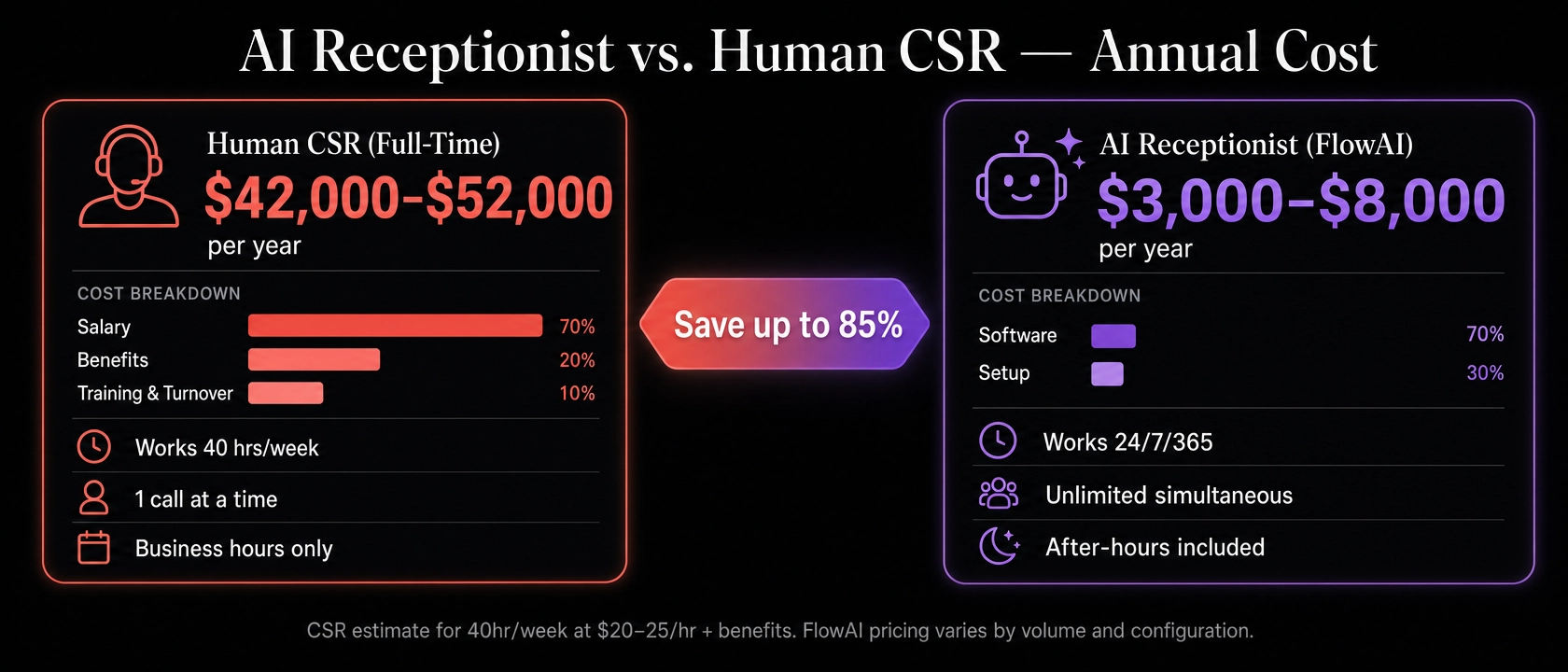
| Factor | Human CSR (full-time) | AI Receptionist (FlowAI) |
|---|---|---|
| Annual cost | $42,000–$52,000+ | $3,000–$8,000 (est.) |
| Hours of availability | ~40 hrs/week (business hours) | 24/7/365 — no exceptions |
| Simultaneous conversations | 1 at a time | Unlimited |
| Speed to first response | Minutes to hours (if working) | 3–5 seconds, every time |
| After-hours coverage | Rarely, with overtime cost | Standard — no extra cost |
| Training & onboarding | Weeks, ongoing | One-time setup (2–4 weeks) |
| Turnover risk | High — avg. CSR tenure 18 months | None |
| Consistent performance | Variable — good days and bad | Consistent, auditable |
This is not a comparison that says humans don't matter — they do, and they do things AI can't. It's a comparison that shows the AI receptionist handles a very specific, very costly problem (the gap between a lead arriving and a human getting to it) at a dramatically lower cost than the human-only alternative.
One nuance worth stating clearly: the best deployments we see pair the AI with a small human team. The AI handles intake volume and after-hours. Humans handle complex conversations, upsells, and relationship calls. That combination outperforms either alone.
Is an AI Receptionist Right for Your Business?
The short answer: if you're in a high-intent local service business and you're not answering every inbound lead within 5 minutes, 24/7 — yes, you need this.
But here's a more specific filter. An AI receptionist is a particularly strong fit if any of these are true for your business:
- You run HVAC, pest control, plumbing, roofing, landscaping, or a similar home service — where customers have urgent, booking-intent searches
- You have a peak season (spring/summer for pest and HVAC; spring/fall for landscaping) where call volume spikes and your team gets overwhelmed
- You run Google LSA, paid search, or social ads — and you're spending money to generate leads that aren't being followed up fast enough
- You've noticed calls going to voicemail, callbacks that happen hours later, or web form leads that don't get a response for days
- You're a solo operator or small team trying to compete with larger companies that have dedicated front office staff
If you checked three or more of those, the math is almost certainly in your favor. The question isn't whether AI intake would help — it's whether the setup is done right. A poorly configured AI that gives wrong answers or fails to book appointments creates more problems than it solves. Configuration and training matter enormously.
At Flowhaus, every FlowAI build is customized to your services, your service area, your calendar, and your voice. We don't hand you a template and wish you luck. We build the system, test it, and hand it off fully operational.